

Manage Order Claims in BoxNCase Admin
In this guide, you’ll learn what claims are, how to create them, and how to manage the complete claims process for faulty or incorrect items.Order Claims Overview
If a customer receives faulty or incorrect items for an order, you can create a claim. A claim allows you to either replace or return an item for a customer, then issue a refund.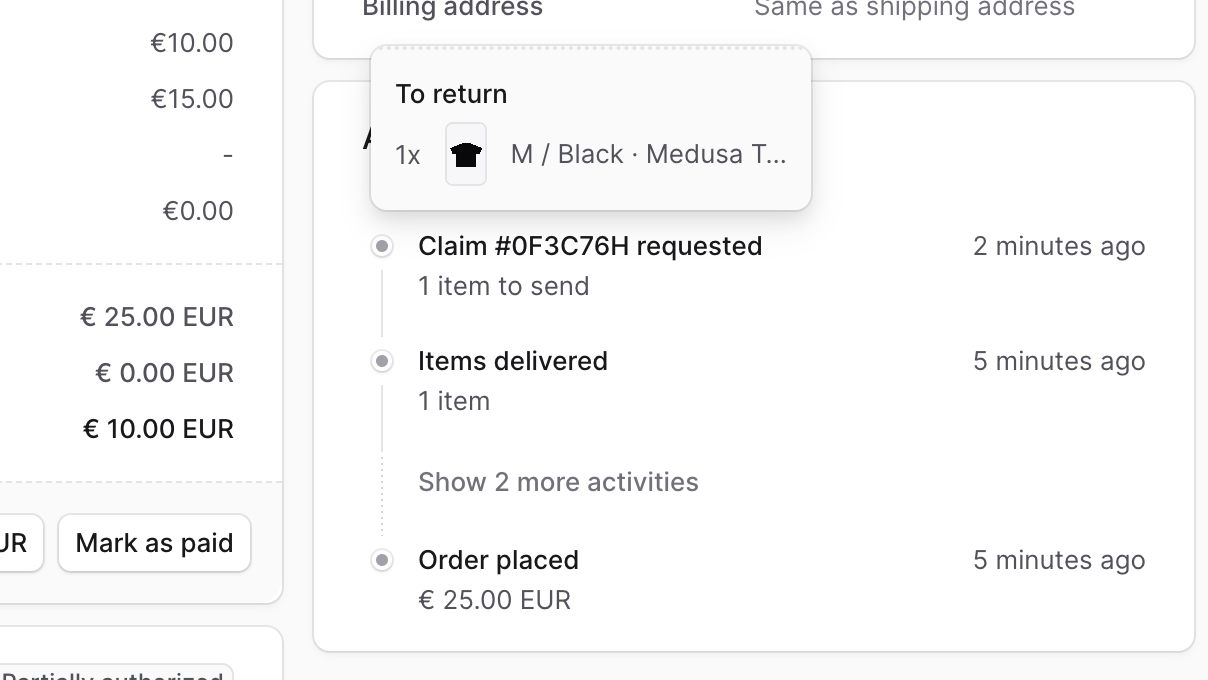
Create a Claim
You can create an order claim after the order’s items have been delivered. To create an order claim:- Go to an order’s details page.
- In the Summary section, click on the icon at the top right.
- Choose “Create Claim” from the dropdown.
-
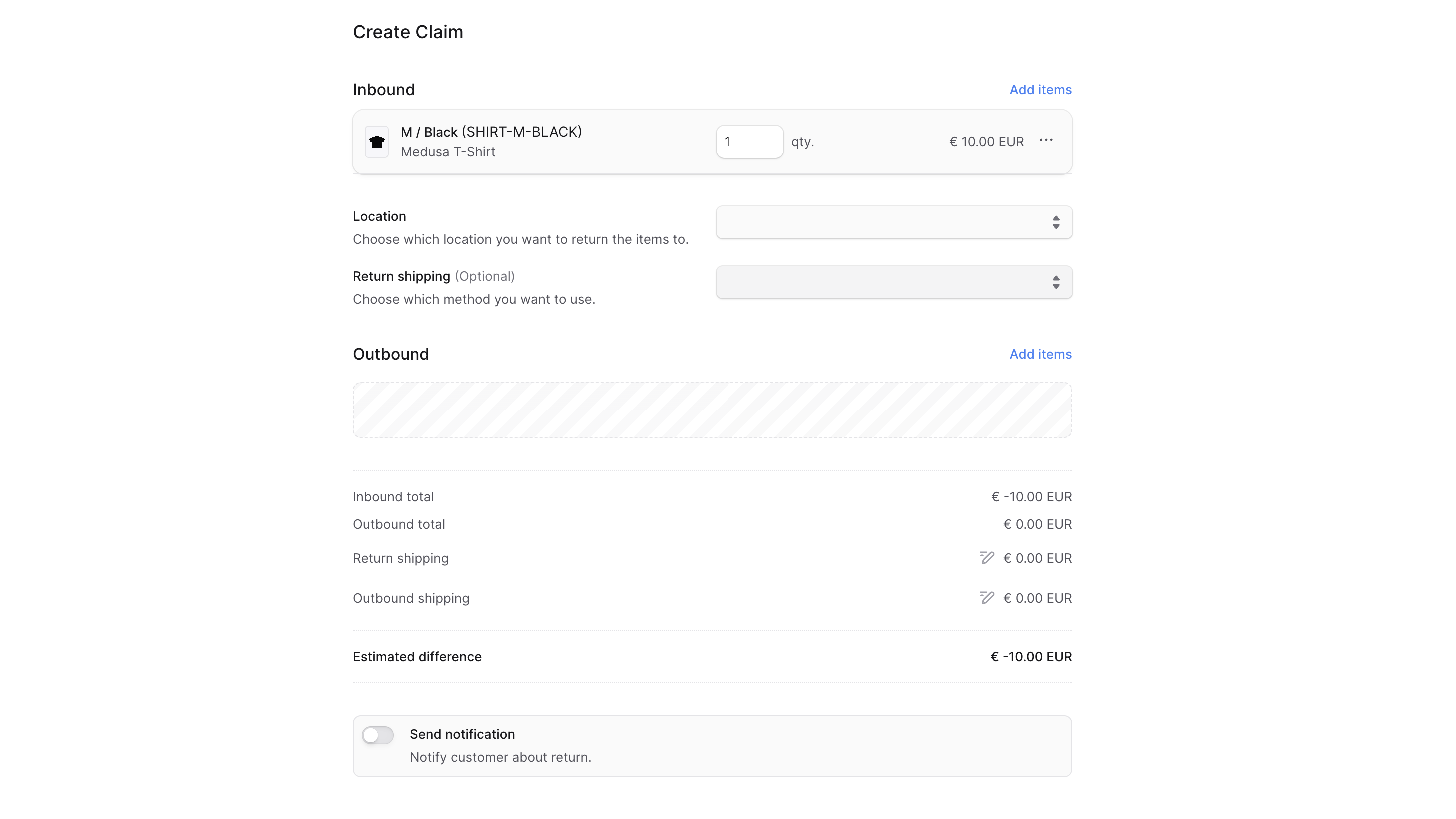
In the form that opens:
- To add items to be returned:
- Click on the “Add items” button in the “Inbound” section.
- In the list that opens, click on the checkbox next to the items you want the customer to return.
- Once done, click on the “Save” button.
- You can then change the quantity to return or manage the item’s details by clicking the icon next to it.
- For the inbound items:
- For the Location field, choose the location to return the items to.
- For the Return Shipping field, you can optionally choose the shipping method to return the items with.
- Choosing a return shipping method adds its cost to the claim total. You can modify the cost by clicking the icon next to the Return Shipping total, then entering the new cost.
- You can optionally add an outbound item to be sent to the customer in replacement:
- Click on the “Add items” button in the “Outbound” section.
- In the list that opens, click on the checkbox next to the items you want to send to the customer.
- Once done, click on the “Save” button.
- You can then change the quantity to send or remove the item by clicking the icon next to it and choosing “Remove” from the dropdown.
- For outbound items, choose the shipping method used to send the items in the Outbound Shipping field.
- The shipping method’s cost is added to the claim total. To edit its cost:
- Click the icon next to the Outbound Shipping total.
- Enter the new cost in the input shown.
- The shipping method’s cost is added to the claim total. To edit its cost:
- If you want the customer to receive a notification that a claim has been created, check the “Send notifications” toggle.
- To add items to be returned:
- Once done, click on the “Confirm Claim” button, then confirm the action by clicking the “Continue” button in the pop-up.
 The claim will be created and you can see it in the Activity section of the order’s details page. If you added outbound items, they will also be added to the “Unfulfilled Items” section.
Handle Outstanding Payment of a Claim
After creating a claim, you can check if there are any outstanding amounts (to be captured from the customer or returned) in the Summary section. To handle outstanding amounts by refunding or capturing the payment, refer to the Payments guide.Managing Returned Items in a Claim
The items to be returned from the customer as part of the claim can be managed similarly to a return. Once you receive the items from the customer, you can mark them as received as explained in the Returns guide.Fulfill Outbound Items in a Claim
As mentioned earlier, the outbound items of a claim are added into the “Unfulfilled Items” section. To fulfill and deliver these items to the customer, refer to the Fulfillment guide.Key Features
BoxNCase claims management provides:- Comprehensive Resolution: Handle both replacement and refund scenarios
- Flexible Item Selection: Choose specific items to return and replace
- Multiple Resolution Types: Replace items, return for refund, or hybrid approach
- Automatic Payment Handling: Calculate and process payment adjustments
- Location Management: Specify return destinations and fulfillment sources
- Shipping Integration: Handle both return and replacement shipping
- Quality Tracking: Document issues for quality improvement
- Customer Notifications: Keep customers informed throughout the claims process
- Activity Tracking: Complete audit trail of claim progress
Claims Workflow
The claims process typically follows these steps:- Identify Issue: Customer reports faulty or incorrect items
- Create Claim: Document the issue and select resolution approach
- Configure Return: Set up return shipping and location (if applicable)
- Add Replacements: Select replacement items to send (if applicable)
- Customer Returns Items: Customer ships faulty items back
- Process Return: Receive and inspect returned items
- Fulfill Replacements: Ship replacement items to customer
- Handle Payments: Process refunds or additional charges
- Close Claim: Complete the claims process
Types of Claims
Replacement Claims
- Defective products: Items with manufacturing defects
- Wrong items shipped: Incorrect product sent to customer
- Damaged in transit: Items damaged during shipping
- Missing components: Products missing parts or accessories
Refund Claims
- Irreparable defects: Items that cannot be replaced adequately
- Discontinued products: Replacements no longer available
- Customer preference: Customer prefers refund over replacement
- Multiple failures: Repeated issues with replacement items
Hybrid Claims
- Partial replacement: Some items replaced, others refunded
- Upgrade compensation: Replace with better item due to issue
- Value adjustment: Partial refund plus replacement
Claims can only be created for delivered orders. For undelivered orders with issues, use order editing or contact fulfillment team to address before shipping.
When to Use Claims vs. Returns/Exchanges
Use Claims For
- Product defects: Manufacturing or quality issues
- Shipping errors: Wrong items sent by mistake
- Damage issues: Items damaged due to packaging or handling
- Quality complaints: Items not meeting expected standards
Use Returns For
- Customer dissatisfaction: Item doesn’t meet customer expectations
- Size/fit issues: Wrong size or doesn’t fit properly
- Changed mind: Customer no longer wants the item
- Duplicate orders: Customer ordered by mistake
Use Exchanges For
- Wrong variant: Customer wants different size/color of same product
- Preference change: Customer wants to try different product
- Seasonal needs: Exchange for different seasonal variant
Claims Investigation Process
Initial Assessment
- Review complaint: Understand the specific issue reported
- Check order history: Verify fulfillment and shipping details
- Document evidence: Collect photos or descriptions from customer
- Determine cause: Identify if issue is manufacturing, shipping, or handling
Resolution Planning
- Choose approach: Decide between replacement, refund, or hybrid solution
- Check inventory: Verify replacement items are available
- Calculate impact: Determine financial and operational impact
- Plan logistics: Organize return shipping and replacement fulfillment
Quality Improvement
- Track patterns: Identify recurring quality issues
- Vendor communication: Share feedback with suppliers
- Process improvements: Update handling or packaging procedures
- Customer follow-up: Ensure satisfaction with resolution
Payment Handling in Claims
Common Payment Scenarios
- Equal value replacement: No payment change needed
- Higher value replacement: Customer may owe difference or store absorbs cost
- Lower value replacement: Customer receives refund for difference
- Full refund: Customer receives complete refund for returned items
- Partial resolution: Combination of refunds and replacements
Payment Processing
- Calculate differences: System automatically computes payment adjustments
- Handle additional charges: Generate payment links or mark as paid
- Process refunds: Issue refunds through original payment method
- Document adjustments: Maintain records for accounting and analysis
Quality Control and Documentation
Documenting Claims
- Issue description: Clear documentation of the problem
- Customer impact: How the issue affected the customer
- Resolution chosen: Why specific resolution was selected
- Cost analysis: Financial impact of the claim
- Follow-up actions: Steps taken to prevent recurrence
Quality Tracking
- Claim frequency: Monitor how often claims occur for specific products
- Issue categories: Track types of problems reported
- Resolution effectiveness: Measure customer satisfaction with resolutions
- Cost impact: Analyze financial impact of claims on profitability
- Vendor performance: Track supplier-related quality issues
Best Practices
- Quick response: Address customer claims promptly to maintain trust
- Thorough investigation: Understand root cause before determining resolution
- Clear communication: Explain the claims process and timeline to customers
- Quality focus: Use claims data to improve product and service quality
- Documentation: Maintain detailed records for analysis and improvement
- Training: Ensure staff understand claims procedures and customer service
- Prevention: Focus on preventing issues that lead to claims
- Follow-up: Check customer satisfaction after claim resolution
Preventing Claims
Quality Assurance
- Incoming inspection: Check products when received from suppliers
- Pre-shipment checks: Verify items before fulfillment
- Packaging standards: Use appropriate packaging to prevent damage
- Handling procedures: Train staff on proper product handling
Communication Improvements
- Accurate descriptions: Ensure product information is correct and detailed
- Quality photos: Provide clear, accurate product images
- Expectation setting: Clearly communicate product specifications
- Proactive updates: Inform customers of any known issues or delays
Troubleshooting Common Issues
Can’t Create Claim
- Verify order has been delivered to customer
- Check if items are eligible for claims per your policy
- Ensure replacement items are available if needed
Payment Processing Problems
- Verify payment method supports refunds/additional charges
- Check payment provider configuration for claims handling
- Ensure customer payment information is current
Inventory Issues
- Confirm replacement items are in stock at fulfillment location
- Verify returned items are properly processed and handled
- Check inventory allocation for replacement items
Customer Communication
- Ensure notification settings are configured properly
- Verify customer contact information is current
- Check that email templates are set up correctly