

Products Overview in BoxNCase Admin
The Products domain is your central hub for managing all product-related information in your BoxNCase commerce platform. This powerful system allows you to handle everything from simple products to complex multi-part assemblies and product bundles with sophisticated variant management.Purpose and Scope
The Products system in BoxNCase serves multiple critical functions:- Product Management: Create, edit, and manage your entire product catalog
- Variant Control: Handle products with multiple variants (colors, sizes, configurations)
- Organization: Organize products using categories, collections, and tags
- Inventory Integration: Track inventory levels and manage stock across multiple locations
- Lifecycle Management: Control product status from draft to published
Key Features
Product Viewing and Navigation
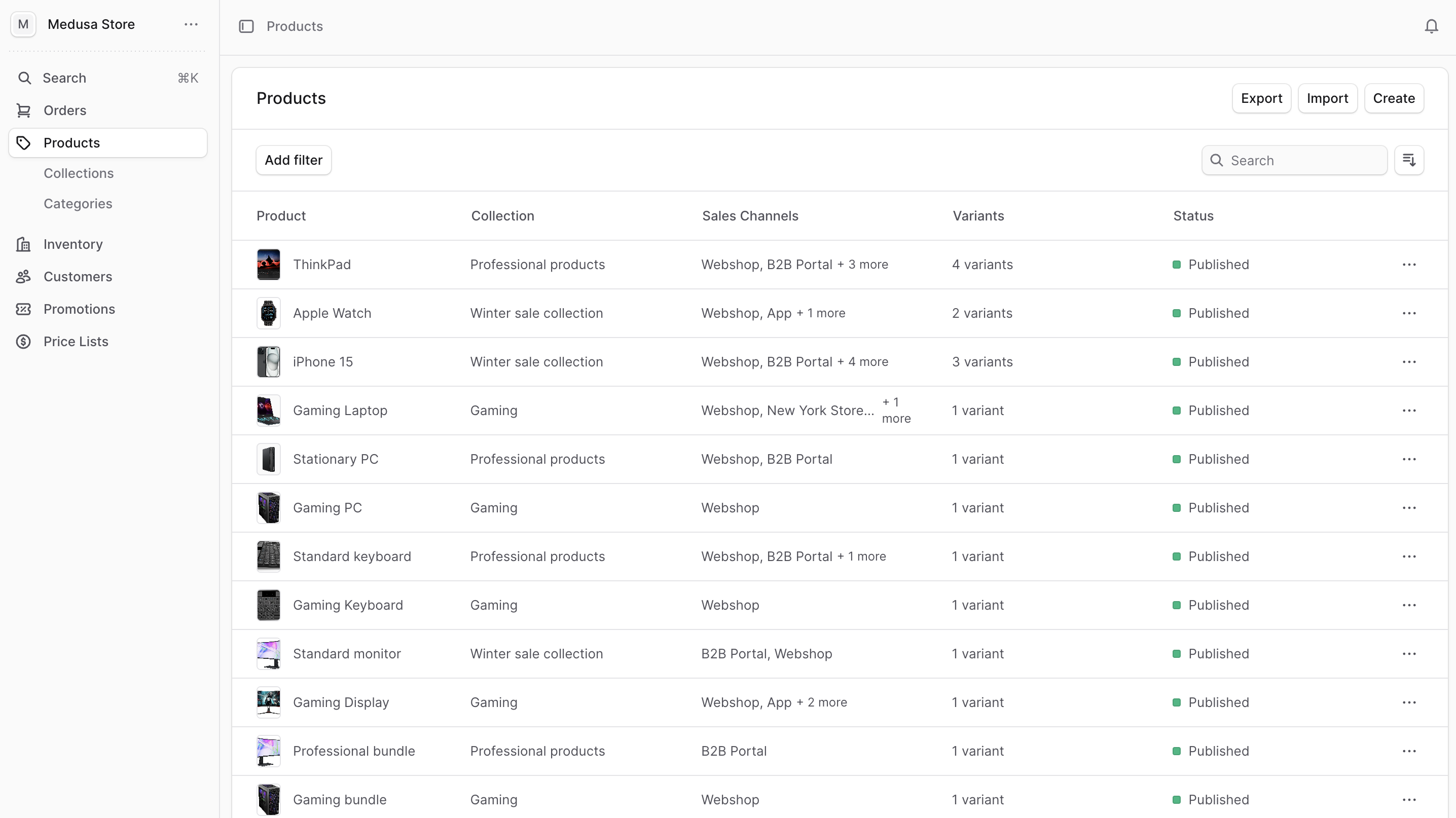
Access your product catalog by clicking Products from the sidebar menu. The product list provides:- Comprehensive Details: View title, collection, status, pricing, and inventory at a glance
- Advanced Search: Quickly locate specific products using powerful search capabilities
- Flexible Filtering: Filter by status, collection, category, type, and custom attributes
- Smart Sorting: Sort by creation date, title, status, or custom criteria
- Bulk Operations: Perform actions on multiple products simultaneously
Main Functions
Product Creation and Management
- Simple Products: Create straightforward products without variants
- Variant Products: Manage products with multiple options (size, color, material)
- Multi-part Products: Handle products composed of multiple inventory items
- Bundle Products: Create product bundles with separate inventory tracking
Product Organization
- Categories: Create hierarchical category structures for product browsing
- Collections: Group related products for marketing and promotional purposes
- Tags: Add flexible tagging for enhanced searchability and organization
Inventory and Fulfillment
- Stock Management: Track inventory levels across multiple locations
- Backorder Control: Configure backorder policies per product and variant
- Shipping Profiles: Assign appropriate shipping methods and costs
Manage Products
Core Product Operations
- Create Product - Create new products with full configuration options
- Edit Product - Modify existing product details and settings
- Manage Variants - Control product variants, pricing, and inventory
Product Organization
- Manage Categories - Create hierarchical product categories
- Manage Collections - Group products by theme or promotion
- Product Tags - Add flexible tagging system
Data Operations
- Import Products - Bulk import products from CSV files
- Export Products - Export product data for analysis or backup
Advanced Configuration
- Product Types - Define custom product classifications
- Shipping Profiles - Configure shipping methods
Best Practices
Product Data Management
- Consistent Naming: Use clear, descriptive product titles
- Unique Handles: Ensure product handles are SEO-friendly and unique
- Rich Descriptions: Provide detailed product descriptions for better discoverability
- Quality Images: Upload high-resolution product images with appropriate alt text
Organization Strategy
- Logical Categories: Create intuitive category hierarchies that match customer expectations
- Strategic Collections: Use collections for seasonal promotions and themed groupings
- Effective Tagging: Implement consistent tagging strategies for enhanced search functionality
Performance Optimization
- Regular Reviews: Periodically audit product data for accuracy and completeness
- Inventory Monitoring: Keep track of stock levels and update inventory regularly
- Status Management: Maintain appropriate product statuses (Draft, Published, Archived)
Find tips to use lists effectively in this guide.