

Manage Exchanges in BoxNCase Admin
In this guide, you’ll learn how to manage order exchanges.Order Exchange Overview
After items have been delivered to the customer, you can create an exchange where the customer returns the items and you send them a new one. Order exchanges are useful if the customer received an incorrect item or they changed their mind about the item they purchased, and you want to offer them a replacement.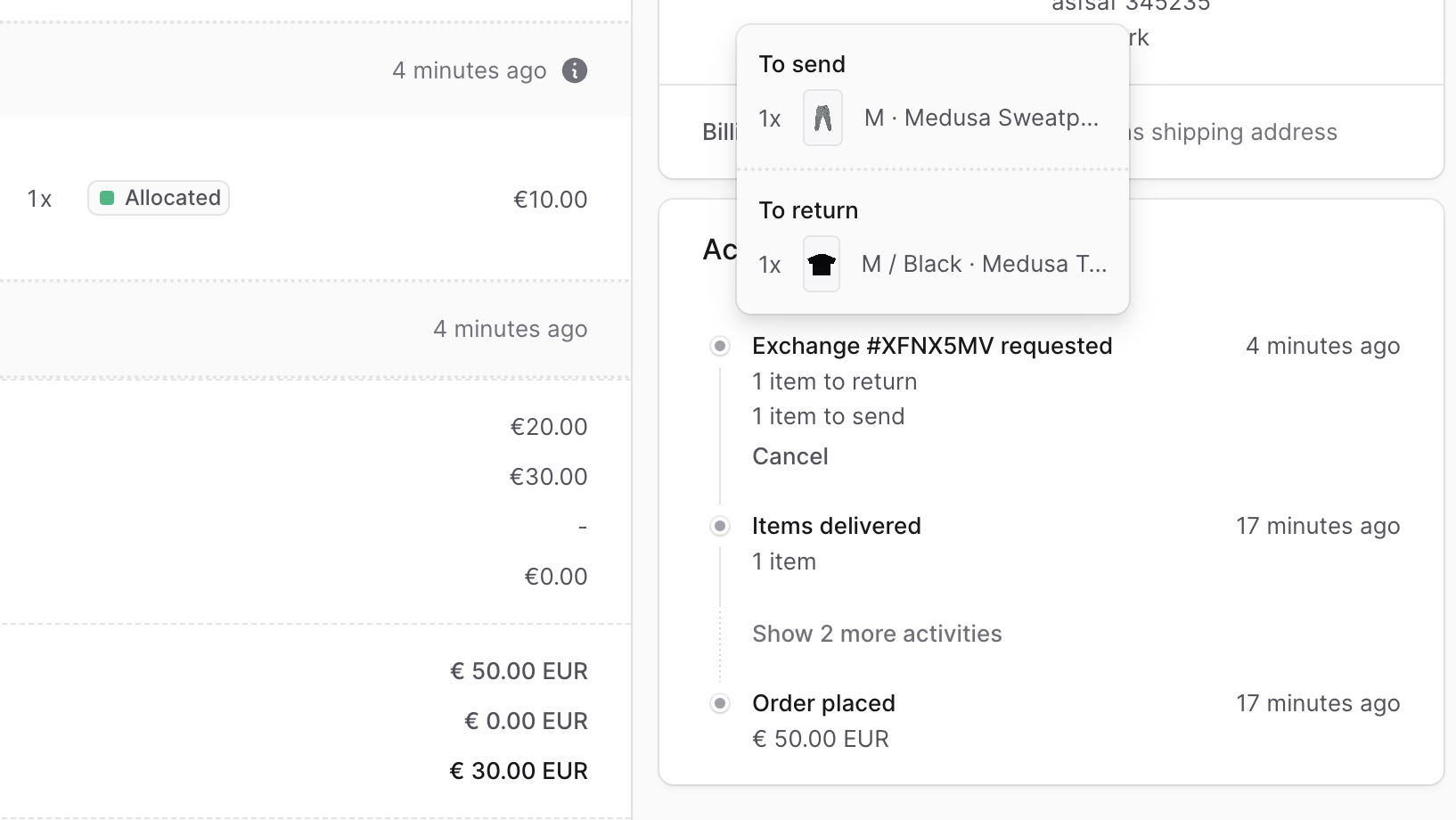
Create an Order Exchange
You can create an order exchange after the order’s items have been delivered. To create an order exchange:- Go to an order’s details page.
- In the Summary section, click on the
⋯icon at the top right. - Choose “Create Exchange” from the dropdown.
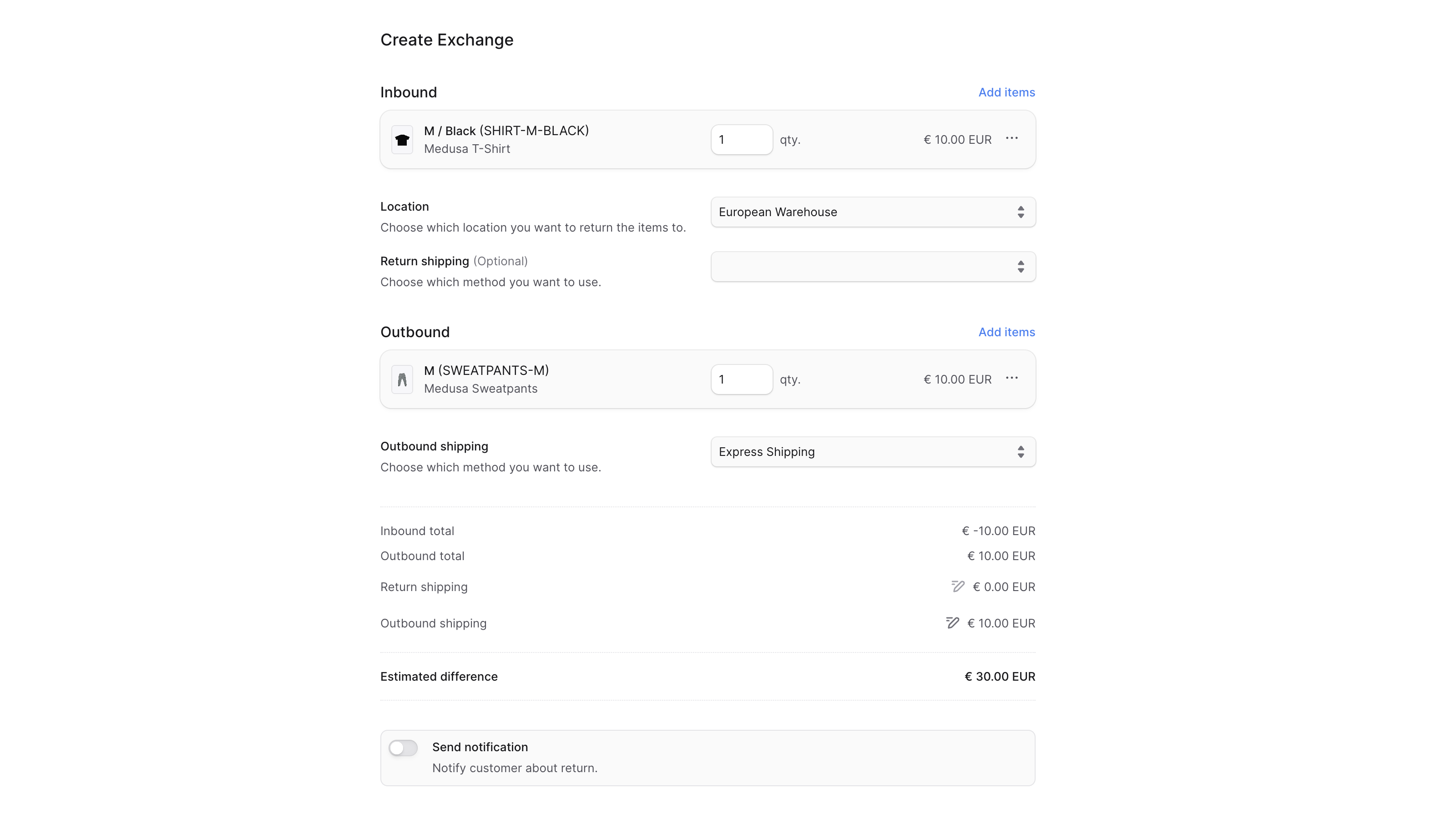
- In the form that opens:
- To add items to be returned:
- Click on the Add items button in the Inbound section.
- In the list that opens, select the items to be returned.
- Click Save when done.
- You can then change the quantity or manage item details using the three-dots icon next to the item.
- Inbound items setup:
- For Location, choose where the items will be returned to.
- For Return Shipping, optionally choose a return shipping method.
- The shipping cost is added to the exchange total.
- To modify it, click the ✏️ icon next to the return shipping total and enter a new cost.
- To add items to be sent to the customer:
- Click the Add items button in the Outbound section.
- Select the items to be sent and click Save.
- You can change quantity or remove the item using the three-dots icon.
- Outbound items setup:
- For Outbound Shipping, choose a method to ship the replacement items.
- Its cost is added to the exchange total.
- To modify, click the ✏️ icon and update the value.
- For Outbound Shipping, choose a method to ship the replacement items.
- If you want the customer to receive a notification, check the Send notifications toggle.
- To add items to be returned:
- Click Confirm Exchange, then confirm by clicking Continue in the pop-up.
 Once created, the exchange appears in the Activity section, and outbound items will be listed in the Unfulfilled Items section.
Handle Outstanding Payment of an Exchange
After creating an exchange, check the Summary section for any outstanding amounts (to be captured or refunded). Refer to the Payments guide for instructions.Managing Returned Items in an Exchange
Returned items from the customer are handled like regular returns. Once received, mark them as received as explained in the Returns guide.Fulfill Outbound Items in an Exchange
The outbound items will appear in the Unfulfilled Items section. To fulfill them, refer to the Fulfillment guide.Cancel an Exchange
⚠️ Canceling an exchange is irreversible. You may only cancel it if:- The outbound items haven’t been fulfilled
- The returned (inbound) items haven’t been marked as received
- Go to the order’s details page.
- In the Activity section, click Cancel next to the exchange entry.
- Confirm by clicking Confirm in the popup.
Key Features
BoxNCase exchange management offers:- Complete Exchange Process: Handle both inbound returns and outbound replacements
- Flexible Item Selection: Exchange different items, quantities, or variants
- Multiple Location Support: Specify different locations for returns and fulfillment
- Shipping Integration: Manage both return shipping and outbound shipping
- Payment Handling: Automatically calculate and process payment differences
- Inventory Management: Seamlessly handle stock adjustments for both directions
- Customer Notifications: Keep customers informed throughout the exchange process
- Activity Tracking: Full audit trail of exchange progress
Exchange Workflow
A typical exchange follows these steps:- Create Exchange: Select items to return and items to send as replacement
- Configure Shipping: Set up return shipping and outbound shipping methods
- Customer Returns Items: Customer ships original items back
- Receive Return: Mark returned items as received and inspect condition
- Fulfill Replacement: Prepare and ship replacement items to customer
- Handle Payments: Process any payment differences (charge more or refund difference)
- Complete Exchange: Finalize the exchange once all items are processed
When to Use Exchanges
Exchanges are ideal for:- Wrong size/color: Customer received incorrect variant
- Defective items: Product has quality issues requiring replacement
- Customer preference: Customer wants different product after seeing original
- Upgrade/downgrade: Customer wants to change to different product tier
- Seasonal changes: Customer needs different version for weather/season
Exchanges can only be created after items have been delivered to the customer. For orders that haven’t shipped yet, use order editing instead.
Exchange vs. Return + New Order
Benefits of Using Exchanges
- Streamlined process: Handle everything in one workflow
- Better tracking: Single transaction for customer and admin
- Automatic payment handling: Calculate differences automatically
- Improved customer experience: Faster replacement shipping
- Simplified accounting: One transaction instead of two
When to Use Separate Return + Order
- Significant price differences: Large payment changes might be easier separately
- Different shipping addresses: Replacement going to different location
- Complex exchanges: Multiple items with different return/replacement timing
- Payment method changes: Customer wants to pay with different method
Payment Handling in Exchanges
Price Differences
Exchanges automatically calculate the difference between returned and replacement items:- Replacement costs more: Customer pays additional amount
- Replacement costs less: Customer receives refund for difference
- Equal value: No additional payment required
Shipping Costs
- Return shipping: May be charged to customer or absorbed by store
- Outbound shipping: Typically follows normal shipping rules
- Combined calculation: Both shipping costs factor into exchange total
Payment Processing
- Positive balance: Generate payment link or mark as paid manually
- Negative balance: Process refund through original payment method
- Zero balance: No additional payment action needed
Managing Complex Exchanges
Multiple Items
- Partial exchanges: Only some items from order need replacement
- One-to-many: Exchange one item for multiple replacement items
- Many-to-one: Combine multiple items into single replacement
- Different variants: Exchange for different size, color, or style
Location Considerations
- Return location: Choose optimal warehouse for receiving returns
- Fulfillment location: Select best location for shipping replacements
- Inventory availability: Ensure replacement items are in stock
- Shipping optimization: Consider location proximity to customer
Timing Management
- Return window: Set clear timeframes for customer to ship returns
- Processing time: Allow time for receiving and inspecting returns
- Fulfillment speed: Prioritize replacement item shipments
- Customer communication: Provide realistic timelines
Quality Control in Exchanges
Inspecting Returned Items
- Verify condition: Check that items meet return standards
- Document issues: Record any damage or quality problems
- Process appropriately: Restock good items, handle damaged items separately
- Update inventory: Ensure accurate stock levels
Replacement Quality
- Double-check items: Verify replacement items before shipping
- Quality assurance: Ensure replacements meet quality standards
- Packaging care: Use appropriate packaging to prevent damage
- Documentation: Include any necessary instructions or information
Best Practices
- Clear policies: Establish and communicate exchange timeframes and conditions
- Quick processing: Handle exchange requests promptly to maintain satisfaction
- Quality control: Inspect all items carefully before restocking or shipping
- Communication: Keep customers informed of exchange progress and timing
- Documentation: Maintain detailed records for customer service and analysis
- Staff training: Ensure team understands exchange procedures thoroughly
- Customer education: Help customers understand exchange process and expectations
- Follow-up: Check customer satisfaction after exchange completion
Troubleshooting Common Issues
Can’t Create Exchange
- Verify order items have been delivered
- Check exchange eligibility per your policies
- Ensure replacement items are available in inventory
Payment Issues
- Verify original payment method supports additional charges/refunds
- Check payment provider settings for exchange handling
- Ensure customer payment information is current
Inventory Problems
- Confirm replacement items are in stock at fulfillment location
- Check that returned items are properly received and restocked
- Verify inventory allocation for replacement items
Shipping Complications
- Ensure return shipping methods are configured properly
- Verify outbound shipping options are available for replacement items
- Check shipping address accuracy for replacement delivery