

Multi-Part Products in BoxNCase Admin
Multi-part products are sophisticated product configurations where each variant requires multiple inventory items to fulfill a single order. This feature is essential for businesses that sell assembled products, kits, or items that consist of multiple components tracked separately in inventory.What are Multi-Part Products?
A multi-part product is a single product offering where each variant is composed of multiple inventory items that must be assembled or combined to fulfill the order. Unlike simple products, multi-part products require tracking of individual components while presenting a unified product to customers.Common Use Cases
Manufacturing and Assembly- Bicycles requiring frames, wheels, handlebars, and other components
- Computers assembled from motherboards, processors, RAM, and cases
- Furniture sets requiring multiple pieces and hardware components
- Craft kits with materials, tools, and instruction components
- Laboratory equipment sets with multiple instruments and accessories
- Educational sets combining books, materials, and digital resources
- Made-to-order products with component variations
- Configurable equipment with interchangeable parts
- Subscription boxes with varying component combinations
Multi-Part vs Bundle Products
Understanding the distinction between multi-part and bundle products is crucial:| Multi-Part Products | Bundle Products |
|---|---|
| Components assembled into single item | Multiple complete products sold together |
| Each variant needs multiple inventory items | Bundle of separate product variants |
| Final product is unified offering | Customer receives multiple distinct items |
| Example: Bicycle (frame + wheels + components) | Example: Camera bundle (camera + lens + bag) |
How Multi-Part Products Work
Inventory Kit System
Multi-part products use BoxNCase’s inventory kit functionality to define which inventory items are required for each product variant. When a customer purchases a multi-part product:- Order Processing: The system identifies all required components
- Inventory Deduction: Each component’s stock is reduced by the specified quantity
- Fulfillment Coordination: All components are coordinated for assembly or shipping
- Stock Management: Individual component availability determines product availability
Creating Multi-Part Products
Step-by-Step Process
Follow the standard product creation process with these specific configurations for multi-part products:1. Product Setup (Steps 1-2)
Configure your product using the standard Details and Organize steps as outlined in the main product creation guide.2. Variants Configuration (Step 3)
In the Variants step, enable the “Has inventory kit” toggle for each variant that requires multiple components.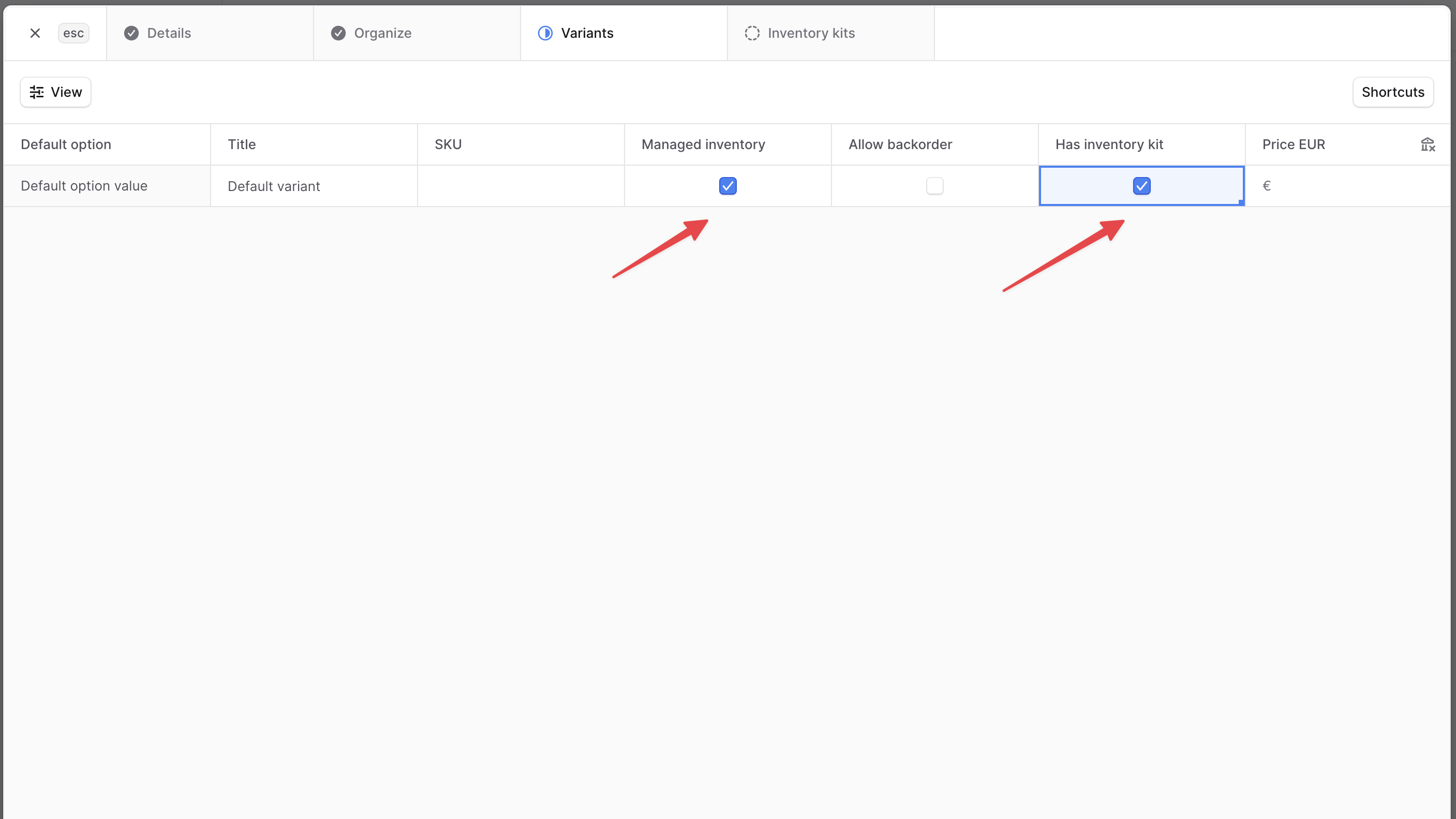
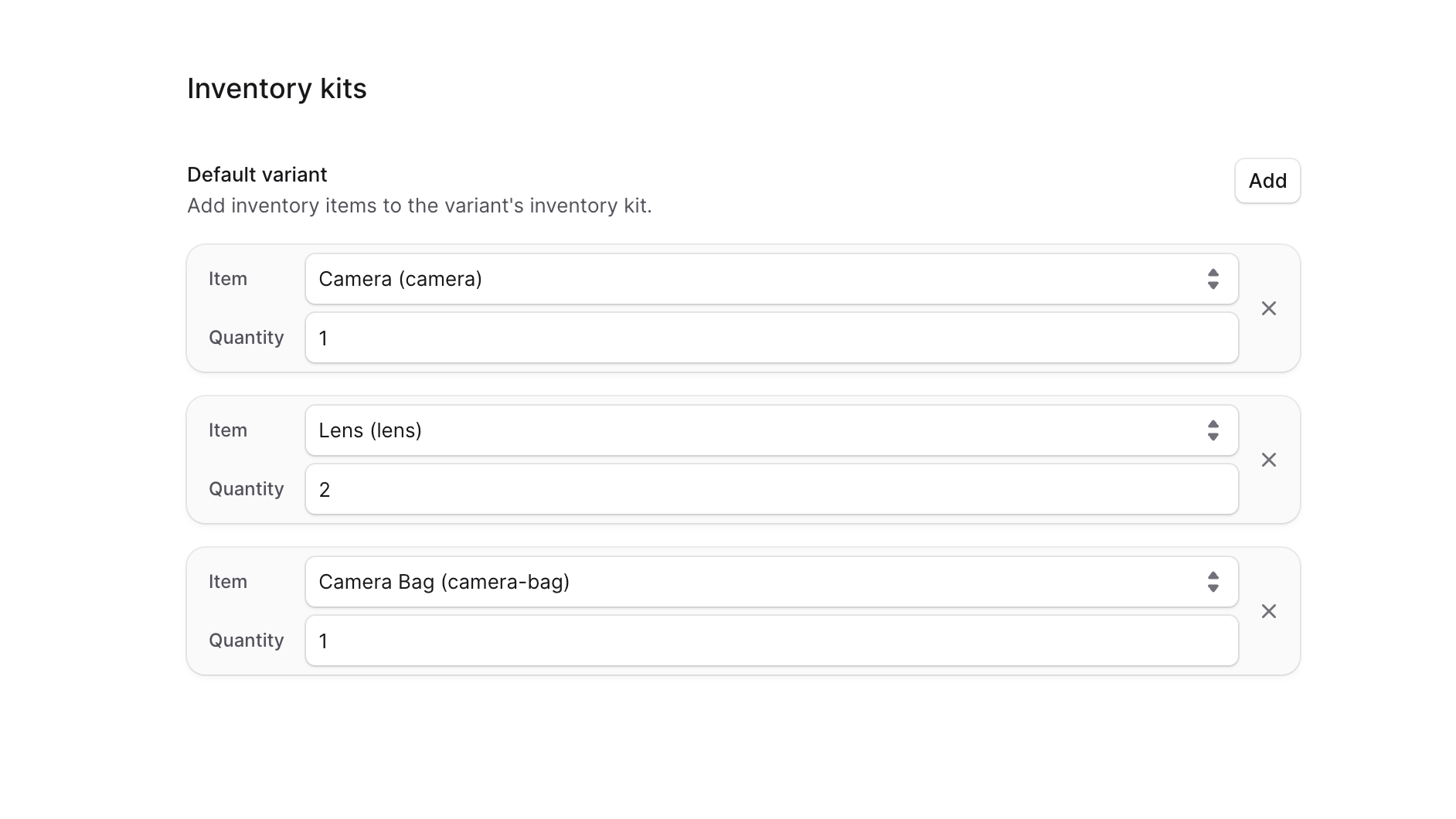
3. Inventory Kits Setup (Step 4)
The fourth step “Inventory Kits” appears automatically when you enable inventory kits. Here you configure the components: For each variant requiring multiple components:- Select Inventory Item: Choose from your existing inventory items
- Set Quantity: Specify how many units of each component are needed
- Example: A bicycle variant might require 2 wheels, 1 frame, 1 handlebar
- Add Additional Items: Use the “Add” button to include more components
- Review Configuration: Ensure all necessary components are included
Best Practices
Component Management
- Accurate Quantities: Ensure component quantities reflect actual assembly requirements
- Stock Coordination: Monitor inventory levels of all components to prevent stockouts
- Component Organization: Use clear naming conventions for component inventory items
Product Configuration
- Descriptive Variants: Name variants clearly to indicate their component composition
- Pricing Strategy: Price multi-part products to account for all component costs and assembly
- Documentation: Maintain clear records of component relationships for future reference
Inventory Considerations
- Stock Monitoring: Track the availability of all components, as shortage of any component affects product availability
- Reorder Planning: Plan reorders based on component consumption rates
- Quality Control: Ensure all components meet quality standards before assembly
Advanced Features
Technical Implementation
For advanced multi-part product features such as dynamic component selection, custom assembly workflows, or complex fulfillment processes, consult with your technical team about implementing custom solutions using BoxNCase’s extensible architecture.Integration Considerations
- Assembly Management: Consider integration with assembly or manufacturing systems
- Quality Tracking: Implement quality control processes for component verification
- Supplier Management: Coordinate with suppliers for reliable component availability
Important: Multi-part products require careful inventory management since the availability of the complete product depends on all component items being in stock. Plan your inventory strategy accordingly.